NEW RELEASE 🚀 SnipBI is live on the official Microsoft Store — Get 50 Free Welcome Scans! Download Free →
✨ SnipBI v1.0.10 is Available for Windows

Stop Typing Invoices by Hand
AI-Powered Invoice Scanner & ERP Automation

SnipBI automatically reads your paper and PDF bills and converts them into clean Excel spreadsheets in seconds — no manual data entry needed.

⚡ 100% Automatic
✍️ Zero Manual Typing
🎁 50 Free Welcome Scans
OFFICIAL WINDOWS APP FREE Get SnipBI from Microsoft Store
Explore Features & Screenshots
★★★★★ Rated 5/5 • Verified Publisher on Microsoft Store
Windows 10 / 11 (x64) 50 Free Welcome Scans Included 100% Local SQLite Privacy
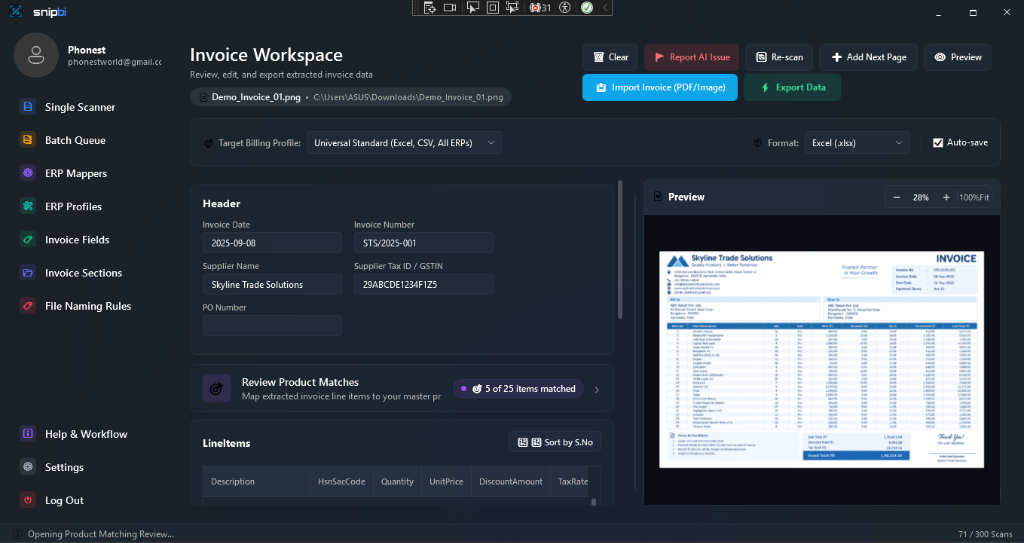
SnipBI Invoice Workspace and Side-by-Side Preview

Designed for High-Speed Accounting

Key features inside the SnipBI app built to eliminate manual typing and accelerate your accounting workflows.

👁️

Side-by-Side Document Preview

Click 'Preview' in the Scanner to view your original invoice document side-by-side with the extracted data table. Zoom, inspect, and verify numbers anytime before export.

⚡

Upload Product Catalog & Barcodes

Import your existing product inventory by uploading an Excel or CSV file in Settings. SnipBI matches supplier barcodes and item descriptions directly to your internal product codes.

📦

Batch Queue Processing

Have multiple invoices? Drop all your files into the Batch Queue from the left menu to parse dozens of vendor bills sequentially in the background while you focus on other work.

⚙️

ERP Profiles & Field Mapping

Configure custom column headers, export rules, and table structures in ERP Profiles to cleanly match your accounting software (e.g. Tally, QuickBooks, Excel).

🛡️

100% Local Privacy Architecture

All extracted financial records and supplier data remain stored locally on your PC in a private SQLite database. Scans are processed securely via TLS with zero external data selling.

🧠

Smart Vendor Layout Memory

Match new supplier formats and custom field rules once — SnipBI remembers vendor structures forever and automatically applies them to all future invoices.

How SnipBI Works — Simple A to Z Guide

Scan, match, and export any invoice in 4 quick steps with zero manual data entry.

1
Step 1 of 4

Open Any Invoice

Simply click 'Import Invoice' or drag & drop any invoice document into the app. Works with files from suppliers, emails, or phone photos.

  • ✓ 📄 PDF files & scanned bills
  • ✓ 📸 Photos & PNG/JPG images
  • ✓ 📑 Add Next Page for multi-page bills
2
Step 2 of 4

AI Reads Everything in Seconds

Our vision AI reads every line of the document automatically with high accuracy so you never have to copy numbers by hand.

  • ✓ 🏢 Supplier Name, Date & Invoice #
  • ✓ 📦 Item Quantities & Unit Rates
  • ✓ 💰 Taxes, Subtotals & Grand Total
3
Step 3 of 4

Smart Product & Barcode Matching

Upload your product list (from Excel or CSV in Settings). SnipBI compares scanned items against your catalog with green checkmarks (✓).

  • ✓ 📋 Upload catalog from Excel or CSV
  • ✓ ⚡ Auto-match barcodes & item stock
  • ✓ 🧠 Match once — remembers forever
4
Step 4 • Ready

Export to Excel, CSV, or JSON

Click 'Export Data' to generate clean spreadsheets. Open directly in Microsoft Excel, or import the file into your accounting / ERP software.

  • ✓ 📊 Clean Excel (.xlsx), CSV, and JSON
  • ✓ 📂 Import into Tally, QuickBooks or ERP
  • ✓ 🎁 50 Free Welcome Scans ready

Your Data Stays With You

We treat your business financial data with absolute respect. Your documents are processed over encrypted TLS and stored locally on your PC. No third-party ad tracking, no data brokers.

Read Privacy Policy

Get Started with SnipBI

Download the latest Windows release and experience automated invoice entry.

SnipBI Icon

SnipBI for Windows

Version 1.0.10 • Windows 10 / Windows 11 (64-bit)

Get on Microsoft Store ✓ Official Microsoft Store release • Includes 50 Free Welcome Scans

Frequently Asked Questions

Everything you need to know about SnipBI and data privacy.

How does SnipBI safeguard my financial data?

All extracted invoice entries, customer accounts, and vendor mappings are stored in a local SQLite database directly on your computer. Your financial records are never saved to our public servers or shared with advertisers.

Which accounting software does SnipBI support?

SnipBI includes flexible column and field mapping engines capable of exporting clean CSV, Excel, JSON, and structured XML formats compatible with Tally, QuickBooks, SAP, Zoho Books, and custom ERP systems.

What types of invoices and receipts can it read?

SnipBI reads digital and scanned PDFs, smartphone photos of receipts, and PNG/JPEG images. The AI Vision engine reliably parses multi-line tables, tax breakdowns, and handwritten annotations.

How do I contact customer support?

Our developer support team is available via email at support@snipbi.com for installation assistance, custom ERP integrations, and feature requests.

Install Free